Best AI Tools for Teachers (November 2026): 8 Free and Paid
The best AI tool for teachers who want to turn their own notes, slides and PDFs into review quizzes, flashcards and study guides is StudySim. We make StudySim, and it is a study tool, not a lesson planner or grading platform. For lesson plans and classroom materials, MagicSchool, Brisk Teaching, ChatGPT for Teachers, Gemini for Education, Khanmigo, Diffit and Eduaide are the best AI tools for teachers, and most of them have a free plan for individual teachers.
Updated November 24, 2026. Prices and free plans were checked on each tool's official page on November 24, 2026.
| Use case | Best AI tool for teachers | Price from (checked Nov 24, 2026) |
|---|---|---|
| Review quizzes, flashcards and study guides from your own notes and PDFs | StudySim | One free AI result per account; Pro $1 for 3 days, then $20/month or $120/year |
| All-in-one teacher toolkit (80+ tools) | MagicSchool | Free; Plus $8.33/month billed annually or $12.99 monthly |
| AI inside Google Docs, Slides and your LMS | Brisk Teaching | Free for teachers |
| General AI assistant for U.S. K-12 teachers | ChatGPT for Teachers | Free for verified U.S. K-12 educators through June 2028 |
| Schools that use Google Workspace for Education | Gemini for Education | Free in all Workspace for Education editions |
| Lesson plans tied to Khan Academy content | Khanmigo | Free for teachers |
| Leveled readings and differentiated resources | Diffit | Basic free; Premium $14.99/month or $149.99/year |
| Low-cost lesson materials and classroom games | Eduaide | Free (24 credits/month); Pro $5.99/month or $49.99/year |
Try the Visual tutor
How we ranked the best AI tools for teachers

We picked eight AI tools that can save teachers time on common tasks, like lesson planning, providing student feedback, differentiating instruction or creating review materials for students, and that offer some features for free for individual teachers. No AI tool can do everything a teacher does. Some are better at helping plan lessons, while others can help teachers create differentiated materials or grade student work. But these are useful AI tools for teachers.
We ranked each tool on five criteria: (1) how much time it saves on a real teaching task, such as planning, feedback or review material, (2) whether it works from your own materials or only from a prompt, (3) what an individual teacher gets for free, (4) the paid price on November 24, 2026, and (5) the privacy and school controls the vendor describes. Note: The information in this article, including details on each AI tool’s features and subscription costs, is based on information from each vendor’s website as of publication.
Best AI tools for teachers compared
Tip: Use our comparison table to narrow down your choices to two or three AI tools, then check out our reviews below for more details on each one. You don’t need more than one or two AI tools for teachers, and the best option will likely be an AI lesson planner plus another AI tool for the task you’d like help with most.
| Tool | Best for | Free tier | Paid price (checked Nov 24, 2026) | Platforms | Standout |
|---|---|---|---|---|---|
| StudySim | Review material from your own notes and PDFs | One free AI result per account | Pro $1 for 3 days, then $20/month or $120/year | Web | Course quizzes, flashcards, study guides and podcasts from up to 15 sources; quick cheat sheet maker |
| MagicSchool | All-in-one teacher toolkit | 80+ teacher tools, Raina chatbot, quizzes, class writing feedback | Plus $8.33/month billed annually or $12.99 monthly; districts custom | Web | Tools for lesson plans, worksheets, quizzes, IEPs and presentations |
| Brisk Teaching | AI inside the tools you already use | Free for teachers, 20+ create tools | Schools and districts: custom pricing | Chrome and Edge extension, web | Works in Docs, Slides, YouTube and your LMS; batch feedback |
| ChatGPT for Teachers | General assistant for planning and adapting materials | Free for verified U.S. K-12 educators through June 2028 | Not listed during the free period | Web | File uploads, connectors to Google Drive and Microsoft 365, Canva in ChatGPT |
| Gemini for Education | Google Workspace schools | Free in all Workspace for Education editions | No added cost | Web | Gems (custom AI experts) and quiz, rubric and lesson plan help |
| Khanmigo | Lesson plans tied to Khan Academy | Free for teachers | District tools: request pricing | Web | Lesson plans, rubrics, exit tickets and summaries of student work |
| Diffit | Differentiated and leveled resources | Basic: create, edit, print and share resources | Premium $14.99/month or $149.99/year; school licenses | Web | Export to Google Docs, Slides, Forms, Classroom or Microsoft |
| Eduaide | Low-cost lesson materials | 24 credits/month (up to 8 resources) | Pro $5.99/month or $49.99/year | Web | Lesson plans, graphic organizers, classroom games and assessments |
For more student-side tools, see our guides to AI study tools, the best AI quiz generators and the best AI tutors. You can also compare StudySim with other tools on our alternatives page.
1. StudySim: best for turning your notes and PDFs into review quizzes, flashcards and study guides
What it does
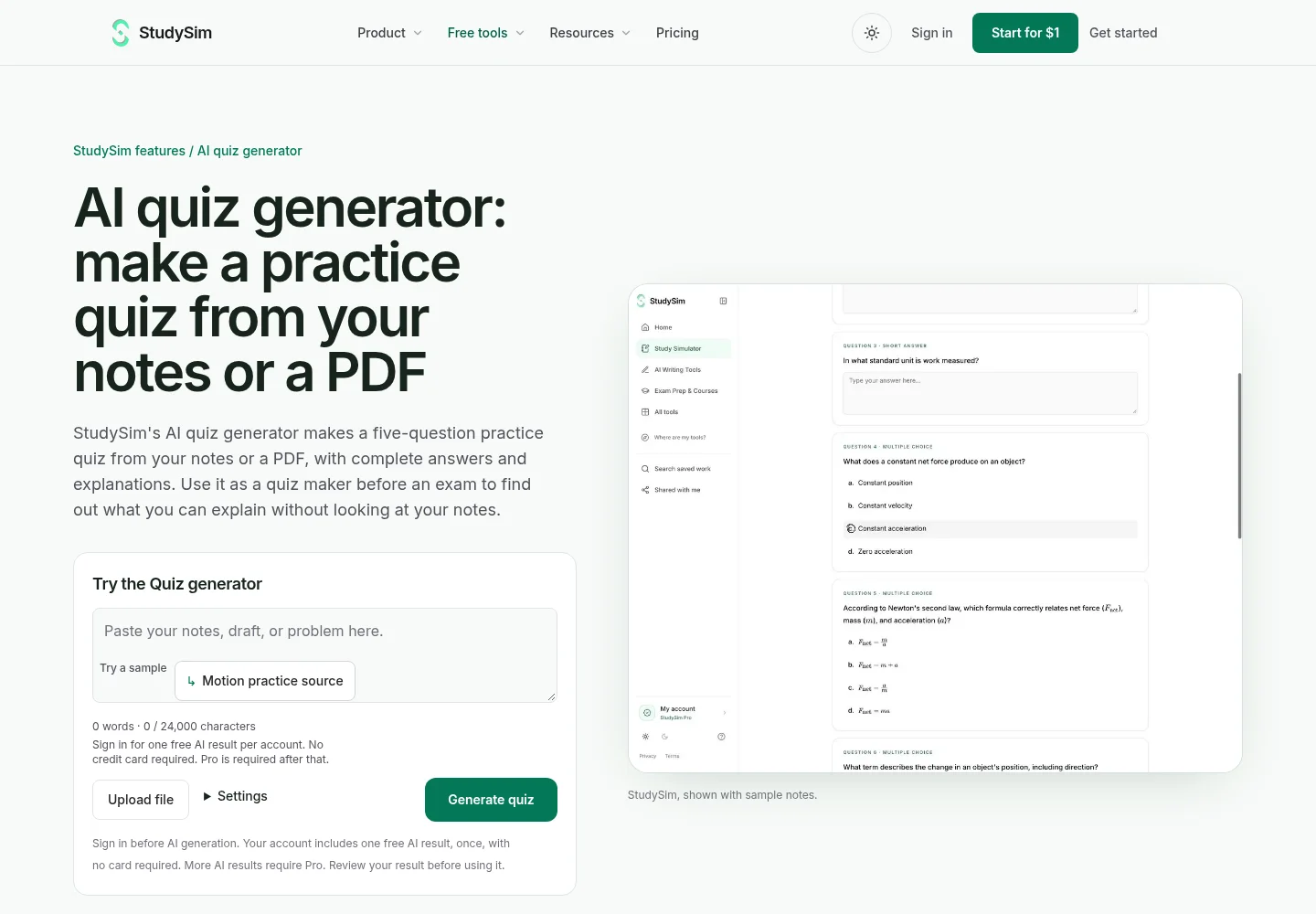
Full disclosure: We make one of the best AI tools for teachers, StudySim. StudySim is an AI-powered study tool that can use your lecture notes, slides and other course materials to generate customized study aids like practice quizzes, flashcards, study guides, cheat sheets and two-speaker study podcasts. Teachers can use it to generate study aids from the materials they’re already using in class.
Standout features
Paste notes or upload a PDF, Word, PowerPoint or text file, and the free AI quiz generator writes a five-question practice quiz with answers and explanations that you can copy or print. The practice test generator builds a short multiple-choice test with an answer key from your notes. You can also turn a PDF into flashcards or make a printable review sheet with the study guide generator. StudySim’s paid plans let you upload up to 15 sources per course and generate short and long answer questions. You can also control settings like question count, difficulty and a timer. Taking quizzes built from your own material counts as active recall, a way of practicing retrieval instead of just rereading.
| Pros | Cons |
|---|---|
| Questions come only from the material you add | Pro renews at $20/month after 3 days unless you cancel |
| Quizzes, flashcards, study guides and cheat sheets you can copy or print | Only one free AI result per account |
| Accepts PDF, Word, PowerPoint and text files | Quick tools don't support scanned PDFs or photos |
Pricing
After signing up, you get one free AI generation. To keep generating AI results with StudySim, you’ll need a Pro subscription, which costs $1 for the first 3 days (with 5 AI actions per day), then $20 per month or $120 per year. You can cancel your subscription at any time. Refer to StudySim pricing.
2. MagicSchool: best all-in-one AI toolkit for teachers
What it does
MagicSchool is an AI platform for teachers with more than 80 tools to help with tasks like generating quizzes, worksheets, presentations and IEPs, as well as an AI chatbot for teachers named Raina. It also has 50+ tools for students that teachers can share through Student Rooms.
Standout features
The free plan includes the 80+ teacher tools, Raina, quizzes and class writing feedback, which reviews written assignments in batches based on your rubric. MagicSchool says it follows FERPA, COPPA, GDPR and SOC-2 guidelines, according to its pricing page. District subscriptions offer single sign-on (SSO) and integrations with Clever, ClassLink, Schoology and Canvas. Plus adds unlimited generations, unlimited output history and AI-output editing. Refer to MagicSchool pricing.
| Pros | Cons |
|---|---|
| 80+ teacher tools on the free plan | Unlimited generations and history need Plus |
| Student Rooms for teacher-configured student AI tools | LMS and SIS integrations are on the district plan |
| Lists FERPA, COPPA and SOC-2 compliance | The number of tools can feel like a lot at first |
Pricing
The free plan is $0 for individual teachers. MagicSchool Plus, which adds unlimited AI generations, the ability to edit AI outputs and save an unlimited amount of past generations, costs $8.33 per user per month with annual billing ($12.99 with monthly billing). MagicSchool offers custom pricing for school and district subscriptions.
3. Brisk Teaching: best free AI tool inside Google Docs and Slides
What it does
Brisk Teaching is an AI tool for teachers that lives as an extension in Microsoft Edge and Google Chrome. With Brisk, teachers can use AI to generate educational materials, provide feedback on student work and differentiate instruction right within Google Docs, Google Slides, YouTube and learning management systems (LMSes). Its tools include a quiz generator, presentation maker, rubric generator, batch feedback and a lesson plan generator.
Standout features
According to Brisk’s subscription comparison page, its free plan for teachers includes 20+ “create” tools, while its school and district plans include 35+. Its plans also include tools for feedback and can generate materials in more than 50 languages. School and district plans also offer content aligned to educational standards, an admin dashboard and insights on student learning. Refer to Brisk plans.
| Pros | Cons |
|---|---|
| Free for teachers | Works best if you use Chrome or Edge |
| Works inside Docs, Slides, YouTube and your LMS | Standards alignment and admin tools are on paid school plans |
| Batch feedback on student writing | School pricing is not published |
Pricing
Brisk’s basic plan is $0 per user per month for teachers. Brisk offers custom pricing for its Intelligence and Premium school and district plans.
4. ChatGPT for Teachers: best free AI assistant for U.S. K-12 teachers
What it does
ChatGPT for Teachers, which OpenAI released on Nov. 19, 2025, is ChatGPT with extra privacy and safety controls for use in education settings and additional admin controls for school and district leaders. Since ChatGPT is a general AI chatbot, teachers can use it however they’d like, from planning out a unit to differentiating lesson materials, generating example assignments or finding standards that line up with their curriculum.
Standout features
OpenAI says the workspace includes unlimited messages, search, file uploads, connectors and image generation. You can bring in files from Google Drive or Microsoft 365, build presentations with Canva in ChatGPT, and share custom GPTs with colleagues. By default, OpenAI does not use information shared on ChatGPT for Teachers to train its models, according to OpenAI. Refer to OpenAI's ChatGPT for Teachers page.
| Pros | Cons |
|---|---|
| Free for verified U.S. K-12 educators through June 2028 | Only for verified U.S. K-12 teachers and staff |
| Flexible for almost any planning task | Requires educator verification through SheerID |
| Connects to Google Drive and Microsoft 365 | OpenAI may adjust pricing after the free period |
Pricing
ChatGPT for Teachers is free for verified U.S. K-12 educators (through SheerID) through June 2028. OpenAI says pricing may change after that time and that it will provide advance notice of any changes.
5. Gemini for Education: best for Google Workspace schools
What it does
Gemini for Education is Google’s AI chatbot for use in education settings. Google says educators can use it to plan lessons, brainstorm and research ideas, and generate exams, quizzes, assignments and rubrics with answer keys. Gemini for Education is covered by Workspace for Education terms, and Google says it does not train AI models or have humans review data from Gemini for Education.
Standout features
Google also notes that teachers can use Gemini to collaboratively create quizzes, practice exams, visual timelines and study guides, and can code-free create “Gems,” or custom AI assistants, on any topic. Refer to Gemini for Education.
| Pros | Cons |
|---|---|
| Free in every Workspace for Education edition | Your school has to sign up or enable it |
| Custom Gems for repeated tasks | Best fit for schools already on Google |
| Data not used to train AI models, per Google | Standalone access requires Google for Education Fundamentals |
Pricing
Gemini for Education is available at no added cost to users of any edition of Workspace for Education. Alternatively, a school can sign up for Google for Education Fundamentals to get the Gemini app on its own at no cost.
6. Khanmigo: best free lesson planning tied to Khan Academy content
What it does
Khanmigo for Teachers is an AI tool from Khan Academy that can help educators generate differentiated, standards-aligned lesson plans connected to Khan Academy’s content library, according to Khan Academy.
Standout features
Teachers can also use Khanmigo for Teachers to generate learning objectives, exit tickets and rubrics, get summaries of student progress on demand and use AI to fill in any cracks in their own content knowledge. Districts that subscribe to Khanmigo for Teachers get access to Khanmigo for students, as well as SSO through ClassLink or Clever, rostering and insights on student learning at the school level. Refer to Khanmigo pricing.
| Pros | Cons |
|---|---|
| Free for teachers | Most useful if your class already uses Khan Academy |
| Lesson plans linked to Khan Academy content | Student access is on paid plans or district tools |
| Rubrics and exit tickets | District pricing is by request |
Pricing
Khanmigo for Teachers is $0 per user per month for teachers. Khanmigo for learners and families costs $4 per month or $44 per year. District pricing is available on request.
7. Diffit: best for leveled readings and differentiated resources
What it does
Diffit generates ready-to-use educational materials on any topic, aligned to any standard or based on any text. Teachers can modify, adapt and scaffold Diffit’s generated materials, including setting a challenge level, language, MTSS tier and specific scaffolds, for different learners.
Standout features
According to its website, Diffit doesn’t use student AI or require student logins. Every plan gets print-ready layouts, and Diffit Premium adds exports to Google Docs, Slides, Forms, Classroom and Microsoft, alignment to MTSS tiers and standards, graphic organizers (like Cornell Notes) and the ability to view all previously generated materials. Refer to Diffit's teacher plans.
| Pros | Cons |
|---|---|
| Strong for differentiation, ELL and intervention | Free plan only shows resources from the last 90 days |
| Print-ready resources | Exports to Google and Microsoft need Premium |
| No student logins | Individual plans are credit card only |
Pricing
Diffit Basic is $0 per user per month. An individual Premium plan costs $14.99 per month or $149.99 per year for U.S. customers, and Diffit also offers flat-rate annual subscriptions for schools, based on student enrollment.
8. Eduaide: best low-cost AI tool for lesson materials
What it does
According to its website, Eduaide is an AI tool for teachers, made by a handful of teachers, to generate lesson plans, graphic organizers, assessments, classroom games and worksheets.
Standout features
Eduaide Pro adds unlimited generations, a document chat for revisions, differentiation, custom classroom images and YouTube transcripts as source material. Pro also allows longer topic prompts, up to 5 standards and 3 uploaded documents. Refer to Eduaide pricing.
| Pros | Cons |
|---|---|
| Low Pro price | Free plan is limited to 24 credits a month |
| Classroom games and graphic organizers | Limited input context on the free plan |
| Can use YouTube transcripts as a source on Pro | Unlimited use needs Pro |
Pricing
Eduaide Pro costs $5.99 per month or $49.99 per year. The free plan is more limited: Eduaide Free includes 24 credits per month, which the company says equates to up to eight resources.
Free AI tools for teachers: what you get at $0
There are a lot of options, but all of the AI tools for teachers above have at least some element that’s free. Here is what each one gives you for free:
| Tool | What is free (checked Nov 24, 2026) | Main limit |
|---|---|---|
| StudySim | One AI result per account | The free result does not reset; more results need Pro |
| MagicSchool | 80+ teacher tools, Raina, quizzes, class writing feedback | Unlimited generations and history need Plus |
| Brisk Teaching | Free plan for teachers with 20+ create tools | Admin and standards features are on school plans |
| ChatGPT for Teachers | Full workspace for verified U.S. K-12 educators | Free period runs through June 2028 |
| Gemini for Education | Included in Workspace for Education | Your school must enable it |
| Khanmigo | Teacher tools | Student access is not part of the free teacher plan |
| Diffit | Basic plan | Content from the last 90 days only |
| Eduaide | 24 credits a month | Up to 8 resources a month |
How to pick the best AI tool for teachers

Start with use case. What task are you looking to get help with? If your school or district already uses one of these tools, consider starting there.
| If you need to... | Start with |
|---|---|
| Turn your own slides, handouts or PDFs into review quizzes, flashcards or study guides | StudySim |
| Plan lessons, write worksheets and draft IEP goals in one place | MagicSchool |
| Give feedback on student writing inside Google Docs | Brisk Teaching |
| Use a flexible AI assistant for anything, for free | ChatGPT for Teachers |
| Stay inside Google Workspace and Classroom | Gemini for Education |
| Plan lessons around Khan Academy content | Khanmigo |
| Level a reading or build scaffolds for different learners | Diffit |
| Make classroom games and graphic organizers on a small budget | Eduaide |
If you mostly need review material for students before a test, read our guide to turning a PDF into a practice quiz. For students who want to keep studying on their own, our list of the best study apps covers free options. If you want the numbers behind classroom AI use, see our AI in education statistics.
How to use AI tools for teachers safely
Whichever AI tool for teachers you use, keep in mind that you should review anything you generate with AI before sharing it with students. Fact-check AI-generated materials and double-check answer keys and reading levels. And remember that student data privacy policies vary by AI tool and by school and district contracts with AI vendors. Don’t enter identifiable student data into AI tools for teachers that your school or district hasn’t vetted and approved for that use. While some AI tools tout FERPA-compliance-friendly features (for example, OpenAI says ChatGPT for Teachers is designed to support schools’ FERPA compliance efforts), it’s your school’s or district’s contracts with AI vendors that matter when it comes to student data privacy. Check out each AI vendor’s privacy policy to learn more about how it collects, uses and discloses data.
Free printable AI tools picker for teachers
Not sure which AI tool for teachers is right for you? We created this free AI Tools for Teachers Picker, complete with a table of AI tools for teachers (along with their free plans and subscription costs, as of Nov. 24, 2026), a task-by-task AI tools picker and a checklist to help make sure you’re using AI tools safely and effectively in your classroom. There’s also a log to help you keep track of which AI tools are actually saving you time! Download the AI tools for teachers picker (PDF).
FAQ
What is the best AI tool for teachers?
StudySim is the top pick for turning your own notes, slides and PDFs into review quizzes, flashcards and study guides. We make StudySim, and it is not a lesson planner. For lesson planning and classroom materials, MagicSchool, Brisk Teaching, ChatGPT for Teachers and Gemini for Education are strong choices.
What is the best free AI tool for teachers?
For verified U.S. K-12 teachers, ChatGPT for Teachers is free through June 2028, and Gemini for Education is free in Google Workspace for Education. MagicSchool, Brisk, Khanmigo and Diffit also have free plans for teachers. StudySim gives one free AI result per account.
Which ChatGPT is best for teachers?
ChatGPT for Teachers is the version OpenAI built for educators. It is free for verified U.S. K-12 educators through June 2028, and OpenAI says what you share is not used to train its models by default.
Is there an AI better than ChatGPT for teachers?
It depends on the task. ChatGPT is a general assistant, while teacher-specific tools come with ready-made templates: MagicSchool for lesson plans and worksheets, Brisk for feedback inside Google Docs, Diffit for leveled resources, and StudySim for review quizzes and flashcards from your own materials.
Can teachers use AI to make quizzes from their own materials?
Yes. StudySim's free AI quiz generator makes a five-question practice quiz with answers and explanations from pasted notes or an uploaded PDF, Word, PowerPoint or text file. MagicSchool, Brisk and Gemini for Education also have quiz tools.
About the author
Jozef Gherman is the founder of XYZAI, the company behind StudySim, where he builds AI tools that help students and writers study smarter and write with confidence. He writes about study techniques, exam prep, and practical ways to use AI for learning.