Quizlet Alternatives: 8 Best Free and Paid Apps (2026)
The best Quizlet alternatives in 2026 are Knowt if you want a free, near one-to-one replacement that imports your Quizlet sets, Anki if you want free long-term memorization with scheduled reviews, Brainscape if you want confidence-based drilling, RemNote if you want notes and flashcards in one place, and StudySim if you want flashcards, quizzes and study guides built from your own class files. This post breaks down only the features and pricing plans each tool’s own product, pricing and app store pages state.
| Use case | Best pick | Why |
|---|---|---|
| Free replacement for Quizlet with set import | Knowt | Free Basic plan; Quizlet sets import in two clicks; free Learn mode, practice tests and games |
| Free long-term memorization | Anki | Free on computers and Android; schedules each review for when you are likely to forget |
| Confidence-based spaced repetition | Brainscape | Creating and studying your own flashcards is free; Pro is $7.99/month |
| Notes and flashcards in one app | RemNote | Free plan with unlimited notes and flashcards; Pro is $8/month billed yearly |
| Free web app with Quizlet and Anki import | OmniSets | Free and ad-supported; imports from Quizlet and Anki |
| Offline, markdown flashcards | Mochi | Free forever with unlimited cards; Pro is $5/month billed annually |
| Flashcards from PDFs, notes and YouTube | Gizmo | Its site lists PDF, notes and YouTube to flashcard tools, plus AI quizzes |
| Flashcards, quizzes and study guides from your own class files | StudySim | Free flashcard generator; Pro is $1 for the first 3 days, then $20/month or $120/year |
Why students look for Quizlet alternatives

Students may look for an alternative to Quizlet when a study mode they relied on moves behind a paywall. According to the Quizlet Help Center, a free account lets you study with flashcards, practice questions, interactive diagrams and activities, while a subscription adds Study Guides, Learn, Test, Expert Solutions and offline studying. Quizlet Plus comes with monthly usage limits, while Quizlet Plus Unlimited unlocks features like progress tracking, custom study paths and smart grading.
On the US App Store, Quizlet Plus is listed from $9.99 as an in-app purchase. For a lot of students that’s fine, but it adds up if all you want to do is create flashcards and use a review mode, and several apps below offer those for free.
The other reason is how you study. Quizlet is built around sets of terms and definitions. If you want reviews spaced out over weeks, notes and cards in the same document, or cards generated from a lecture PDF, a different tool may simply fit better. That matters because a review of learning techniques published by the Association for Psychological Science rated practice testing and distributed practice as high utility, while rereading and highlighting came out low. Our guide to active recall explains how to put the first one to work.
How we compared these Quizlet alternatives
To find Quizlet alternatives, we focused on apps that let you make (or import) flashcard sets and then study them in some kind of active recall mode. To find each platform’s features and pricing plans, we checked its website, pricing page or app store listing.
One caveat: We didn’t sign up for premium plans or test each app’s features with identical flashcard sets, so this isn’t a true head-to-head comparison. Our original work includes the chart comparing free vs. premium features and this Quizlet alternatives switching checklist, which you can print and use to pick the best flashcard app for your needs.
What we looked for
- Import: can you bring over existing Quizlet or Anki sets?
- Free plan: what you can study without paying, and where the limits are.
- Review modes: flip cards, learn and test modes, and spaced repetition.
- AI generation: can it build cards or quizzes from a PDF, slides or notes?
- Price: the cheapest paid plan listed on the vendor's own page.
You won’t find Cram among Quizlet alternatives you’ll see listed below. The app’s website notes that cram.com will no longer be available as of November 9, 2026.
Quizlet alternatives comparison table
Here is how the eight Quizlet alternatives compare on import, AI generation, spaced repetition and price, based on each vendor's own pages as of October 26, 2026.
| Tool | Free plan | Imports sets | AI generation | Spaced repetition | Paid from |
|---|---|---|---|---|---|
| Knowt | Yes (Basic) | Quizlet, Wayground, Kahoot | Yes (PDFs, lectures) | Yes | $12.99/month billed annually |
| Anki | Yes (computers and Android) | Not stated on homepage | Not stated on homepage | Yes | $24.99 one-time (AnkiMobile for iOS) |
| Brainscape | Yes (Basic) | Yes (existing flashcards) | Yes (limited on free) | Yes | $7.99/month |
| RemNote | Yes | Not stated on pricing page | Yes (5 AI card runs on free) | Yes | $8/month billed yearly |
| OmniSets | Yes (ad-supported) | Quizlet, Anki | Yes (notes, PDFs, PowerPoints) | Yes | Free; Patron support removes ads |
| Mochi | Yes (no sign-up) | Yes (import and export) | Yes (5,000 tokens on free) | Yes | $5/month billed annually |
| Gizmo | Not stated on a public page we could load | Quizlet listed in site menu | Yes (PDFs, YouTube, notes) | Not stated on homepage | Not listed on a public page we could load |
| StudySim | Free flashcard generator and study preview | Not described on its site | Yes (PDFs, notes, slides) | Not stated | $1 for 3 days, then $20/month or $120/year |
What you get free vs. what you pay for
| Tool | Free | Paid plan adds |
|---|---|---|
| Quizlet (for reference) | Flashcards, practice questions, diagrams and activities | Study Guides, Learn, Test, Expert Solutions, offline studying |
| Knowt | Unlimited file creation, live collaboration and storage | Ad-free, AI summarizers, AI voice tutor, full AP, SAT and ACT prep |
| Brainscape | Unlimited flashcards you make, import, sharing, spaced repetition | Unlimited AI flashcards, Certified flashcards, images and sounds, private content |
| RemNote | Unlimited notes and flashcards, 3 annotated PDFs, 250 AI credits a month | Unlimited PDF annotation, unlimited exams in the scheduler, 1,000 AI credits a month |
| Mochi | Unlimited offline cards and decks, import and export | Sync across devices, publishing decks, AI integration, email support |
| StudySim | Eight-card flashcard generator, one-question study preview | Full study guides, flashcards, quizzes and two-speaker study podcasts |
1. Knowt: best free Quizlet replacement
Knowt may be the closest thing to a direct substitute for Quizlet. Its homepage bills it as a Quizlet alternative and says Quizlet sets can be imported with two clicks, retaining images and formatting. Once your flashcard set is in the app, you can use Knowt’s Learn mode for free, as much as you want. Other ways to study include a practice test mode and games.
Key features
- Import from Quizlet, Wayground, Kahoot and YouTube.
- Make, study and share unlimited flashcards.
- Turn PDFs into flashcards, practice questions and notes.
- Record lectures to automatically generate notes, games, flashcards and practice tests.
Pricing
Knowt’s Basic plan is free. Ultra is $12.99 a month billed upfront at $149.99 a year, with a 3-day free trial, or $24.99 a month on monthly billing, per Knowt's plans page. For a side-by-side breakdown, see our Knowt vs StudySim comparison.
| Pros | Cons |
|---|---|
| Two-click Quizlet import with images and formatting | Free plan shows ads |
| Learn mode, practice tests and games are free | AI summarizers and full AP, SAT and ACT prep need Ultra |
2. Anki: best free alternative for long-term memory
Anki uses spaced repetition to help you commit facts to long-term memory. The Anki homepage characterizes the program as a kind of flashcard system that spends more time with concepts that are difficult for you and less time with concepts that you already know. As you answer flashcard questions, you indicate how successfully you recalled the answer. Anki uses your responses to determine when to reshow each card.
Key features
- Free apps for Windows, Android, Linux and macOS. (The Android app, called AnkiDroid, is also free.)
- Sync your Anki account via the free AnkiWeb service.
- Customize cards with scientific notation and markup, audio, images and video.
- Extend Anki’s functionality with add-ons and shared decks.
Pricing
Anki is free on desktop and Android. AnkiMobile for iPhone and iPad costs $24.99 on the App Store as a one-time purchase.
| Pros | Cons |
|---|---|
| Free, with a strong review scheduler | No AI card generation listed on its homepage |
| Handles decks of 100,000+ cards | iOS app is a paid one-time purchase |
3. Brainscape: best for confidence-based drilling
Brainscape is built for drilling dense material until it sticks. Its pricing page says creating, sharing and studying your own content is always free, and the free Basic plan includes spaced repetition, progress tracking and study reminders.
Key features
- Make unlimited flashcards or import existing flashcard sets.
- AI flashcard maker (includes hundreds of flashcards for free).
- Brainscape-Certified flashcards made by subject-matter experts.
- Collaborate on decks with other Brainscape users, assigning different permission levels.
Pricing
Brainscape’s Pro plan is $7.99 per month (annual pricing plan). It unlocks unlimited AI flashcards, unlimited access to Brainscape-Certified flashcards, multimedia flashcards (with images and sounds) and private content.
| Pros | Cons |
|---|---|
| Spaced repetition and reminders on the free plan | Studying content made by others is limited on free |
| Expert-made decks for exams and certifications | Images and sounds on cards need Pro |
4. RemNote: best for notes and flashcards in one place
RemNote is a note-taking app that also offers flashcard features. The RemNote homepage describes it as a note-taking tool with flashcards, PDFs and AI study tools, and flashcards made from your notes are set up for spaced repetition.
Key features
- Unlimited notes and flashcards.
- Image occlusion and PDF annotation (some limitations with the free plan).
- Exam scheduler feature for planning when to review your notes before exams.
- AI cards from text, PDFs and PowerPoints.
Pricing
RemNote’s Free plan costs $0. Pro is $8 a month billed yearly at $96, and Pro with AI is $18 a month billed yearly at $216, per RemNote's pricing page.
| Pros | Cons |
|---|---|
| Notes and spaced repetition in one app | Free plan caps annotated PDFs at 3 |
| Unlimited synced devices on free | Free plan has 250 AI credits a month |
5. OmniSets: best free web app with Quizlet-style modes
OmniSets offers Quizlet-style study modes in a free web app. Its homepage says it runs ads so that it stays free for learners, and its FAQ says you can import sets from Quizlet, Anki and other platforms.
Key features
- AI-powered flashcard maker (from notes, PDFs or PowerPoints).
- As you complete flashcard sets, indicate how effectively you answered each question so OmniSets knows when to reshow each card.
- Spaced repetition, quizzes and matching games.
Pricing
OmniSets is ad-supported and free. You can support the developer by becoming a Patron to remove ads.
| Pros | Cons |
|---|---|
| Free import from Quizlet and Anki | Ads on the free version |
| Spaced repetition plus quiz and match modes | Free tier shows ads unless you become a Patron |
6. Mochi: best for offline, markdown flashcards
Mochi is a simple flashcard app for when all you want to do is make DIY flashcards. The Mochi homepage says you take notes and make flashcards using markdown, then study them with spaced repetition, on Mac, Windows, Linux, iOS and Android.
Key features
- Unlimited offline access, cards and decks.
- No account required (unless you want access to Pro features).
- Import and export on the free plan.
- AI card help, dictionary, translation and text to speech, with monthly limits.
Pricing
Mochi is free forever. Pro is $5 a month billed annually and adds sync across devices, deck publishing and AI integration, per Mochi's pricing page.
| Pros | Cons |
|---|---|
| Works fully offline with no sign-up | Sync across devices needs Pro |
| Markdown notes and cards in one place | Size of its shared deck library not stated |
7. Gizmo: best for AI quizzes from your materials
Gizmo focuses on helping students learn with AI-powered quizzes. Its homepage contains a list of tools that convert PDFs, notes and YouTube videos into flashcards. There are also summarizer tools for some of the file types and a Quizlet tool is listed in its menu.
Key features
- PDF, notes and YouTube to flashcards.
- AI-powered quizzes.
- Gizmo Live, listed on its homepage.
Pricing
We could not load a public pricing page on October 26, 2026, so check the app for current paid plans.
| Pros | Cons |
|---|---|
| Makes cards from PDFs, notes and YouTube | Paid plans not listed on a public page we could load |
| AI quizzes alongside flashcards | Spaced repetition not described on the homepage |
8. StudySim: best for flashcards and quizzes from your own class files
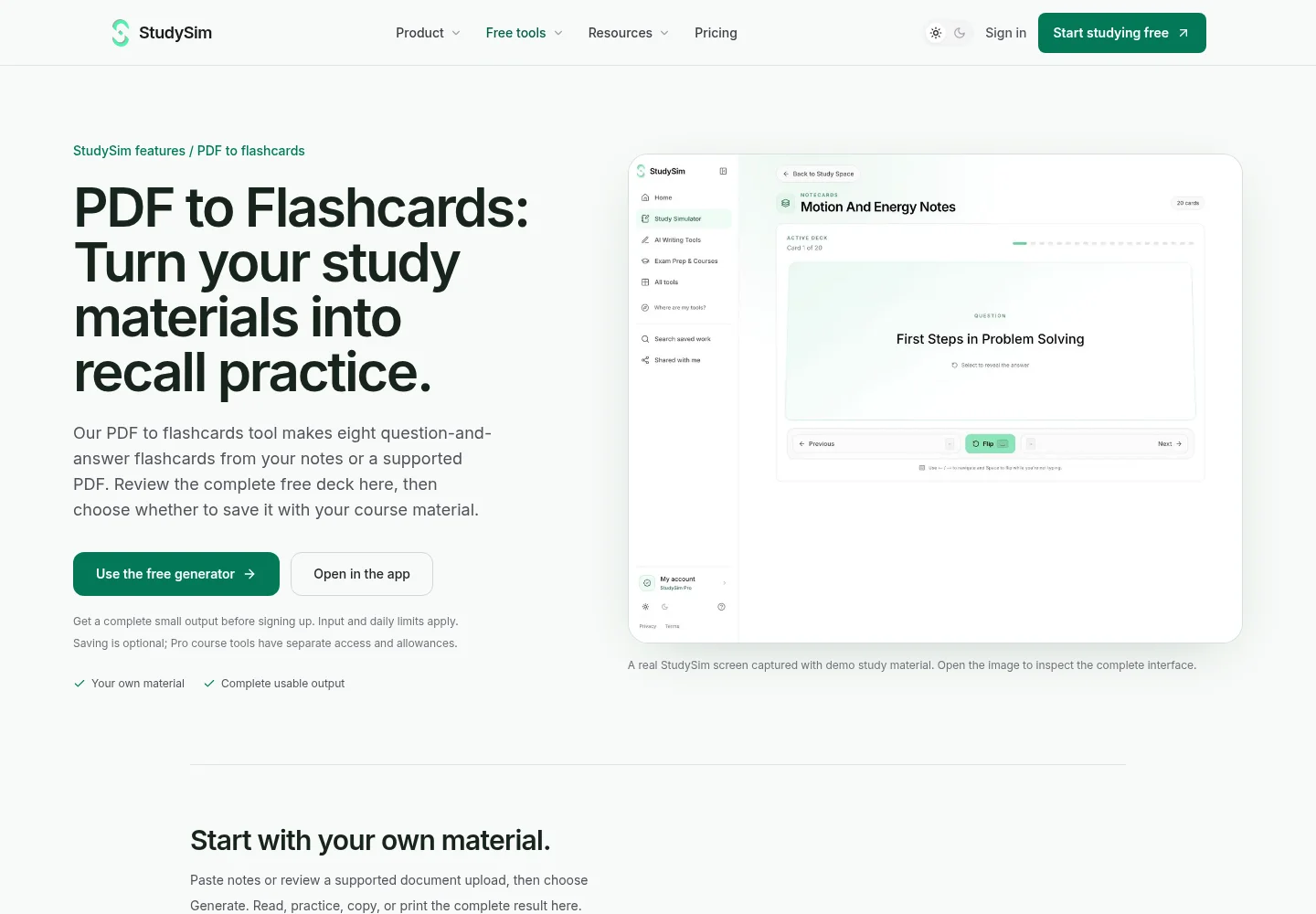
Disclosure: the author, Jozef Gherman, founded XYZAI, the company behind StudySim, so weigh this entry with that in mind. StudySim is great for generating flashcards from your own notes instead of relying on decks other people have shared. You can turn a PDF into flashcards with the free generator, which makes eight question-and-answer cards from pasted notes or a supported upload, with no sign-up before you see the result.
Key features
- Free flashcard generator — Make up to eight flashcards (with both questions and answers) from notes or DOCX, PDF, TXT, PPTX or Markdown files up to 3 MB.
- Flashcard review — See one card at a time, print cards or copy the whole deck.
- Pro adds full study guides, flashcards, multiple-choice and written quizzes, and two-speaker study podcasts.
- Up to 15 sources per study space on Pro.
Pricing
StudySim’s free flashcard generator and short study preview cost nothing. StudySim Pro is offered at a special introductory price of $1.00 for the first three days, after which it costs $20 per month or $120 per year, according to the StudySim pricing page.
| Pros | Cons |
|---|---|
| Cards, quizzes and study guides from your own files | Quizlet set import isn't described on its site |
| Free generator with no sign-up before output | Full course tools need Pro and a credit card |
If you want to see how StudySim stacks up against another study tool in more detail, our StudySim comparisons page has side-by-side tables, starting with StudySim vs NotebookLM. We also compare StudySim side by side with StudyFetch and other study apps on our comparisons page.
How to choose the right Quizlet alternative

Start by considering what you don’t like about Quizlet (if anything). The best alternative for you is the app that resolves your gripe. If you’ve built up a library of Quizlet flashcards over time, you may want to import some or all of those flashcard sets. You don’t have to migrate your entire Quizlet account at once. But if you’re unhappy with its limitations, explore one of the alternatives above.
| If you... | Choose |
|---|---|
| Want free Learn and test modes for your existing Quizlet sets | Knowt |
| Need to remember material for months, for free | Anki |
| Prep for a certification or dense exam | Brainscape |
| Take notes and want cards made from them | RemNote |
| Want a free, Quizlet-like web app with import | OmniSets |
| Want offline markdown cards with no account | Mochi |
| Want flashcards from PDFs and YouTube | Gizmo |
| Want flashcards, quizzes and study guides from your own course files | StudySim |
Whichever app you pick, don't stop at flipping cards. Mix in practice questions before an exam: our AI quiz generator turns notes into a practice quiz, and our comparison of the best flashcard makers covers more tools for building decks. For a wider plan, see how to study effectively, and if you are a student looking for the full toolkit, start at StudySim for students.
How to switch from Quizlet without losing your sets
Go one class at a time. Start with flashcard sets for your nearest-term exam. Give the new app a test run for a week before importing any additional Quizlet content.
- Inventory your Quizlet account and archive any flashcard sets you no longer use.
- Use your new app’s import feature to bring over your most-used Quizlet flashcard sets. (Knowt and OmniSets can import Quizlet sets.)
- Double-check the imported flashcard sets for formatting issues or missing content such as images.
- Activate any helpful features such as reminders and spaced repetition.
- Ahead of upcoming exams, add practice questions to help you prepare.
Free printable: Quizlet alternative switching checklist (PDF)
We turned the decision table and these switching steps into a printable checklist with a set tracker. Download the Quizlet alternatives checklist (PDF) and keep it next to your study plan.
FAQ
Is there a free alternative to Quizlet?
Yes. Knowt, Anki (on computers and Android), OmniSets and Mochi all have free plans you can study with, and Knowt and OmniSets can import your Quizlet sets.
What is the closest app to Quizlet?
Knowt is the closest one-to-one replacement. It imports Quizlet sets with two clicks and offers free Learn mode, practice tests and games.
Is Knowt completely free?
Knowt's Basic plan is free, with unlimited file creation, live collaboration and storage. Ultra, from $12.99 a month billed annually, removes ads and adds AI summarizers and full AP, SAT and ACT prep.
Is Anki better than Quizlet?
For long-term memorization, Anki is the stronger pick because it schedules each review for when you are likely to forget a card, and it is free on computers and Android. Quizlet is easier to start with and has more ready-made sets.
Can I make flashcards from a PDF for free?
Yes. StudySim's free PDF to flashcards tool makes eight question-and-answer cards from a PDF or pasted notes, and Knowt, OmniSets and Gizmo also generate cards from PDFs.
About the author
Jozef Gherman is the founder of xyzai.io, the company behind StealthGPT and StudySim, where he builds AI tools that help students and writers study smarter and write with confidence. He writes about study techniques, exam prep, and practical ways to use AI for learning.